iPhone + Apple Watch

Your gym routine, on your wrist.

Plan it once on iPhone, then train with your phone in your bag. Apple Watch shows every exercise, counts your sets and times your rests, and taps your wrist when it's time to lift again. No Watch? Run the same workout on iPhone. Then export every workout and let the AI you prefer analyze your progress.

Download on the App Store

Free · No account · No ads

How it works

Less phone. More lifting.

No more unlocking your phone between sets to check a note or start a timer. GymCrumbs follows your plan so you can focus on the weight in front of you.

Plan on iPhone

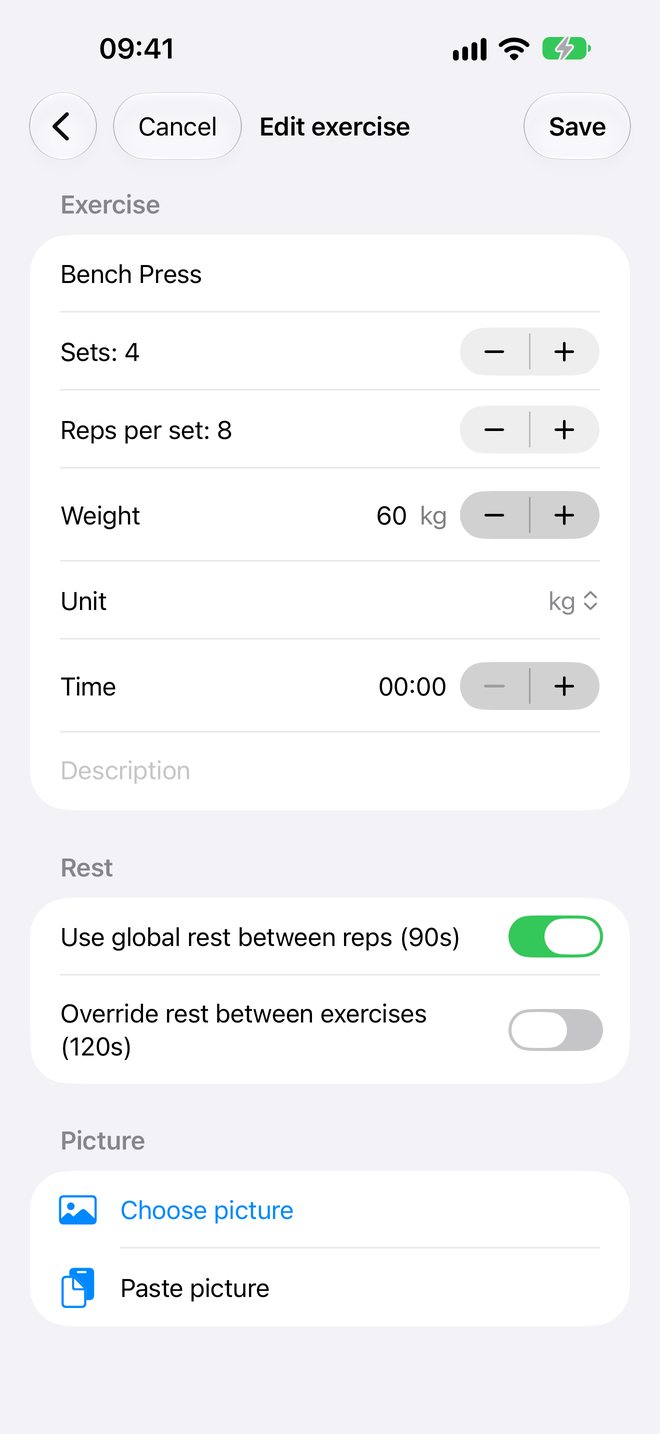
Create workout days like Push, Pull and Legs. Add exercises with sets, reps and weight, and choose your rest times.

Start on Apple Watch

Pick today's workout on your wrist. Your routine is already there, so your phone can stay in the bag.

Lift, rest, repeat

Tap Set Done and the rest countdown begins. When it ends, your wrist taps you. Every set is logged.

Your data, your AI

Export every workout. Let any AI coach you.

GymCrumbs doesn't lock your training inside the app. Export your routine, every change you've made to it and a log of every workout, then hand them to the AI you prefer, like ChatGPT, Claude or Gemini, and ask what's working.

  1. Export On iPhone, tap Files › Export files. One tap, everything included.
  2. Share Choose an AI assistant, a spreadsheet or your coach. GymCrumbs needs no account; your chosen service may have its own requirements.
  3. Ask Which lifts are stalling? Am I resting too long? How should I progress next month?
  • Sets and reps
  • Weights
  • Planned vs. real rest
  • Heart rate per set and rest*
  • Every routine change, dated
  • Spreadsheet-ready CSV

*Heart rate is recorded when you train with Apple Watch.

workout_plan.jsonworkout_change_log.jsonworkout_history.csvdaily_workout_logs · 24 files

Here are my last 8 weeks of GymCrumbs workouts. Which lifts are stalling, and how should I change my routine?

Bench Press has stayed at 60 kg for 5 weeks, and your rests between sets crept up from 90 s to over 2 min. Your squat keeps climbing.

Try 3×6 at 62.5 kg with a strict 2 min rest, then return to 4×8 once all sets feel solid.

Illustrative example. Use any AI assistant you like.

On your wrist

Always know your next set.

The exercise, the weight, the reps and which set you're on. One glance and you're ready.

  • Big, readable workout screens made for the gym floor
  • See the whole session and where you are in it
  • Picks up where you left off if the app is closed mid-workout
Apple Watch showing Bench Press, 60 kg, set 1 of 4 with a Set Done button

Rest timer

Rest timers that start themselves.

Finish a set and the countdown is already running. A tap on your wrist tells you when to go again, so you don't rest too little or too long.

  • Separate rests between sets and between exercises
  • Set them once, then fine-tune any exercise
  • Hands busy? Shake your wrist to log a set
Apple Watch rest countdown between sets

On iPhone

Plan your week in minutes.

Build each workout day once and reuse it every week. Change a weight in seconds when you get stronger.

  • Sets, reps and weight in kg or lb
  • Timed holds like planks
  • Notes and a photo of the machine or setup
GymCrumbs exercise editor on iPhone with sets, reps, weight and rest settings

And more

Small things that add up.

Lock Screen Live Activity

See the current exercise and timer on your iPhone's Lock Screen and Dynamic Island, with a button to move on.

Apple Health and heart rate

With your permission, Watch sessions are saved as Functional Strength Training workouts in Apple Health, with live heart rate on your wrist. iPhone-only sessions stay in GymCrumbs.

Shake to log a set

Chalk on your hands? A quick shake marks the set done. Turn it off anytime in Settings.

No Watch? Use iPhone

Run the same workout on your phone, with rest countdowns, a notification when it's time to go and a Lock Screen Live Activity.

Works offline

Your routine lives on your Watch. Logs reach your iPhone the next time they connect.

Your files, your way

Export your routine, its change history, every workout log and a spreadsheet-ready CSV, or import a routine file.

Private by design

Your workouts are yours.

GymCrumbs has no servers collecting your data. Routines and workout logs stay on your iPhone and Apple Watch.

No accountOpen the app and start. No sign-up, no email, no password.
No adsNothing between you and your next set.
No trackingNo analytics or third-party SDKs. App Store label: Data Not Collected.

Read the full privacy policy.

FAQ

Good questions.

Do I need an Apple Watch?

It's recommended, not required. With Apple Watch your phone stays in your bag: the Watch shows each exercise, times your rests, taps your wrist when it's time to lift and records your heart rate and an Apple Health workout. No Watch, or left it at home? Start the same workout on iPhone, with Set Done, rest countdowns, Back, Skip and Stop, a notification when your rest is over and a Live Activity on the Lock Screen. Heart rate and Apple Health recording need the Watch.

How much does it cost?

GymCrumbs is free to download, with no ads, subscriptions or in-app purchases.

Does my iPhone need to be nearby while I train?

No. Once your routine is on the Watch you can leave your phone in your bag or locker. Finished workouts are sent to your iPhone the next time the devices connect.

Does it work with Apple's Workout app?

Start your session in GymCrumbs instead. It records its own Functional Strength Training workout in Apple Health (with your permission), and Apple Watch runs one workout at a time.

Can I analyze my progress with AI?

Yes, and it's one of the best parts. On iPhone, tap Files › Export files to share your routine, its change history and every workout log: sets, reps, weights, planned and real rest times, and heart rate when you train with Apple Watch, plus workout_history.csv with one row per set, ready for any spreadsheet. Give them to ChatGPT, Claude, Gemini or any AI assistant, a spreadsheet or your coach, and adjust your routine with what you learn.

Can I use pounds?

Yes. Choose kg or lb for each exercise.

Where is my data stored?

On your iPhone and Apple Watch. There is no GymCrumbs account or server. Workouts you allow to be saved in Apple Health are managed by Apple Health. Details are in the privacy policy.

I need help or have an idea.

Visit support or write to [email protected].
Leave the phone. Bring the plan.

Free on the App Store for iPhone, even better with Apple Watch.

Download on the App Store